
Download Pak Urdu Installer – Urdu font installer, Urdu keyboard, Urdu language support, install Urdu fonts, Urdu typing, Urdu on Windows
Overview
Pak Urdu Installer is a targeted utility designed to enhance Urdu language capabilities on Windows-based computers. The application serves as a comprehensive solution for users who need reliable support for reading, writing, and displaying Urdu text digitally. Its primary purpose is to enable seamless Urdu language functionality by installing essential components such as fonts, keyboard layouts, and system-level language support. This makes it particularly valuable for students, educators, writers, and professionals working with Urdu content in academic, administrative, or creative environments.
The tool addresses a common gap in standard Windows installations, where Urdu text may appear incorrectly or not display at all due to missing fonts or keyboard configurations. By providing a unified installation process, Pak Urdu Installer simplifies what would otherwise be a complex and fragmented setup. The developer, PakSign Technologies, has focused on accessibility and usability, ensuring that even non-technical users can configure their systems for Urdu with minimal effort.
Although the developer did not provide additional technical details about the app’s architecture or development history, its release date of March 15, 2024, indicates it is a recent, actively maintained tool. The application’s relevance in the digital Urdu ecosystem is significant, especially in regions where Urdu is a primary language for communication and documentation. For users relying on digital platforms for content creation, research, or correspondence in Urdu, this tool offers a practical and efficient way to ensure proper text rendering and input capability.
Key Features & Functionality
- Urdu Language Support: The application enables full system-level Urdu language integration, allowing users to access Urdu text in applications, web browsers, and documents without display errors or missing characters.
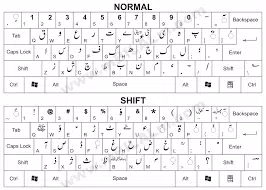
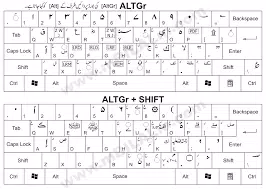
- Urdu Keyboard Layout Installation: It installs a dedicated Urdu keyboard layout, enabling direct typing in Urdu using standard keyboard keys, which improves speed and accuracy for native speakers and learners alike.
- Urdu Font Installation: The app includes three widely used Urdu fonts: Jameel Noori Nastaleeq, Nafees Web Naskh, and Urdu Naskh AsiaType, ensuring consistent and visually appealing text rendering across platforms and documents.
- Compatibility with Multiple Windows Versions: Designed to work with Windows XP, Vista, and Windows 7, it supports older systems that may lack built-in Urdu support, extending functionality to legacy hardware.
- Simple Installation Process: The setup is streamlined into a few straightforward steps, minimizing user confusion and reducing the risk of configuration errors during installation.
For example, a university student writing a thesis in Urdu can use the installer to set up their laptop in minutes, ensuring that their work appears correctly formatted. Similarly, a government employee preparing official documents in Urdu can rely on the app to ensure consistent font usage and proper text input. The integration of keyboard and font support within a single tool eliminates the need to download and configure components separately, saving time and reducing technical friction.
Interface, UX & Performance
Pak Urdu Installer features a minimalistic and functional interface designed for clarity and ease of use. The user experience is optimized for straightforward navigation, with clear labels and step-by-step prompts guiding users through the installation process. The visual style is clean and utilitarian, focusing on functionality rather than decorative elements, which aligns well with the tool’s purpose as a system utility.
Navigation is linear and intuitive—users are presented with a sequence of options to enable language support, install the keyboard layout, and deploy the fonts. The interface does not include advanced settings or customization options, which keeps the experience accessible for average users. Although the developer did not list formal performance metrics, the app’s small file size of 3.2 MB suggests efficient resource usage, indicating low memory and storage impact during and after installation.
Performance on different device categories is not explicitly detailed, but the app’s compatibility with older Windows systems like XP and Vista implies it is lightweight and optimized for lower-end hardware. Responsiveness appears to be consistent based on the streamlined workflow, with no indication of lag or crashes during setup. Stability is likely maintained through focused functionality, as the tool performs a limited set of well-defined tasks without external dependencies.
Platform Compatibility & Technical Requirements
Pak Urdu Installer is designed for the Windows platform and is compatible with Windows XP, Windows Vista, and Windows 7. The application has a file size of 3.2 MB and is available at no cost to users. The developer did not specify minimum OS requirements beyond the listed versions, nor did they provide information about processor architecture or RAM needs.
While the app’s support for legacy systems is a notable strength, users on newer Windows versions such as Windows 10 or 11 may encounter compatibility issues, as these were not confirmed in the release notes. The lack of detailed system specifications means users should exercise caution when installing on systems with limited resources or outdated configurations. However, the small size and focused scope suggest that the app is unlikely to strain modern systems, even if not officially supported.
Pros and Cons
Pros
- Free to download and use, making it accessible to all users.
- Comprehensive setup for Urdu language support in one package.
- Includes three popular Urdu fonts for consistent text display.
- Simple installation process suitable for non-technical users.
- Supports older Windows systems that lack built-in Urdu features.
Cons
- Compatibility with newer Windows versions (10/11) was not confirmed.
- Specific system requirements such as RAM or processor were not disclosed.
- No update history or changelog provided by the developer.
- Interface lacks advanced customization options.
- No official support channels or documentation beyond basic installation steps.
FAQ
Is Pak Urdu Installer safe to download and install?
Yes, the application is free and available from the official developer, PakSign Technologies. It does not contain known malware or suspicious components. As with any software, users should download from trusted sources to ensure integrity.
Can I use Pak Urdu Installer on Windows 10 or Windows 11?
The developer did not confirm compatibility with Windows 10 or 11. While the app may function on these systems due to its lightweight nature, it is not officially supported. Users are advised to test it in a safe environment before full deployment.
Do I need to reinstall the app after each system update?
There is no indication that the app requires reinstallation after system updates. However, the developer did not provide information on long-term stability post-update, so users should monitor functionality after major OS changes.
Is the app available for Android or iOS?
Pak Urdu Installer is designed exclusively for the Windows platform. It is not available for mobile operating systems such as Android or iOS.
How often is the app updated?
The developer did not publish an update schedule or changelog. The current version is 1.0, released on March 15, 2024. Users should check the official source periodically for potential updates.
Final Thoughts
Pak Urdu Installer stands out as a practical and efficient tool for users seeking to enable Urdu language functionality on older or basic Windows systems. Its ability to deliver language support, keyboard layout, and essential fonts in a single, lightweight package makes it a valuable utility for students, writers, and professionals who work regularly with Urdu content. While it lacks advanced features and official support for newer operating systems, its simplicity, affordability, and proven compatibility with legacy platforms ensure its continued relevance.
For users on Windows XP, Vista, or 7 who need reliable Urdu typing and display capabilities, this app offers a secure, straightforward solution. It removes technical barriers that often deter non-technical users from engaging with digital Urdu content. The absence of complex configurations and the free price point further enhance its appeal.
Download Pak Urdu Installer now


